This integration is available as part of our Premium subscription. By connecting your POS to FoodByUs, you can seamlessly link your sales data to your menu items, providing enhanced and accurate insights into your Cost of Goods Sold (COGS).
Connecting your Tevalis Integration
Step 1: Please reach out to your Tevalis Account Manager or Customer Success Advisor or alternatively contact onboarding@tevalis.com. As Tevalis’ process, a case will then be created with the Onboarding team, who will distribute your required onboarding credentials.
Step 2: To connect your Tevalis account, navigate to Account Settings > Integrations > Point-of-Sale (POS)
Step 3: Click ‘Connect’ on the Tevalis tile

Step 4: Provide your Tevalis GUID, Company ID and Site ID. Please contact Tevalis if you are unsure of what your credentials are.
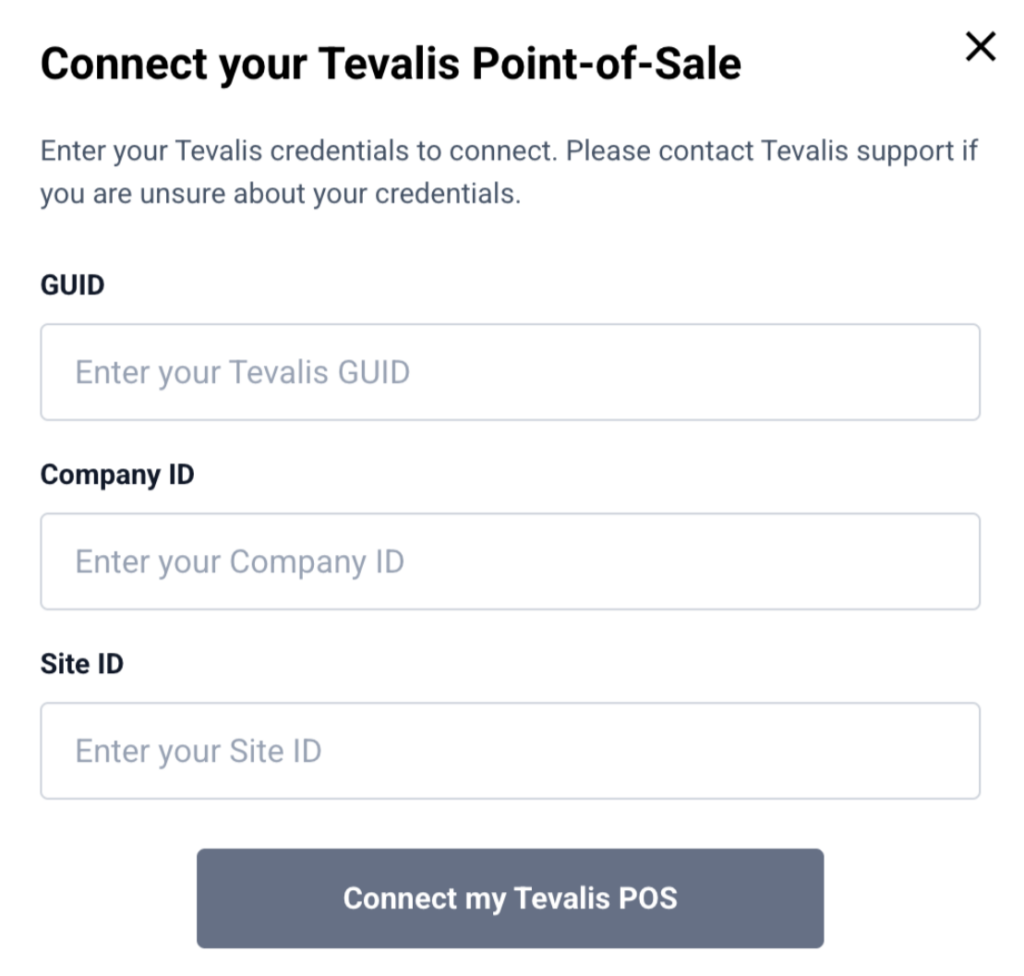
a) After entering your credentials, the FoodByUs development team will send a connection request to Tevalis to enable the integration.
b) You will be notified by FoodByUs support once the integration has been successfully established.
Step 5: If you only have a single location set up in Tevalis, the setup is now complete and we will start syncing your products and orders.
Step 6: If you have multiple locations setup within Tevalis, please contact Tevalis for support.
Disconnecting Tevalis
If you’d like to disconnect your Tevalis integration with FoodByUs, please contact support@foodbyus.com. Disconnecting the integration will require the FoodByUs development team to contact Tevalis to initiate the disconnection.
Step 1: Navigate to Account Settings > Integrations > Point-of-Sale (POS)
Step 2: Click ‘View Details’ on the Tevalis tile.